Reuse linked questions
Use linked questions when several question copies should share wording, structure, or settings. The editor calls these synchronized questions. Each copy still collects its own answer.
Create linked (synchronized) questions
- Write a question in Content.
- Open its three-dot actions menu and choose Make synchronized.
- Duplicate it to create another linked question.
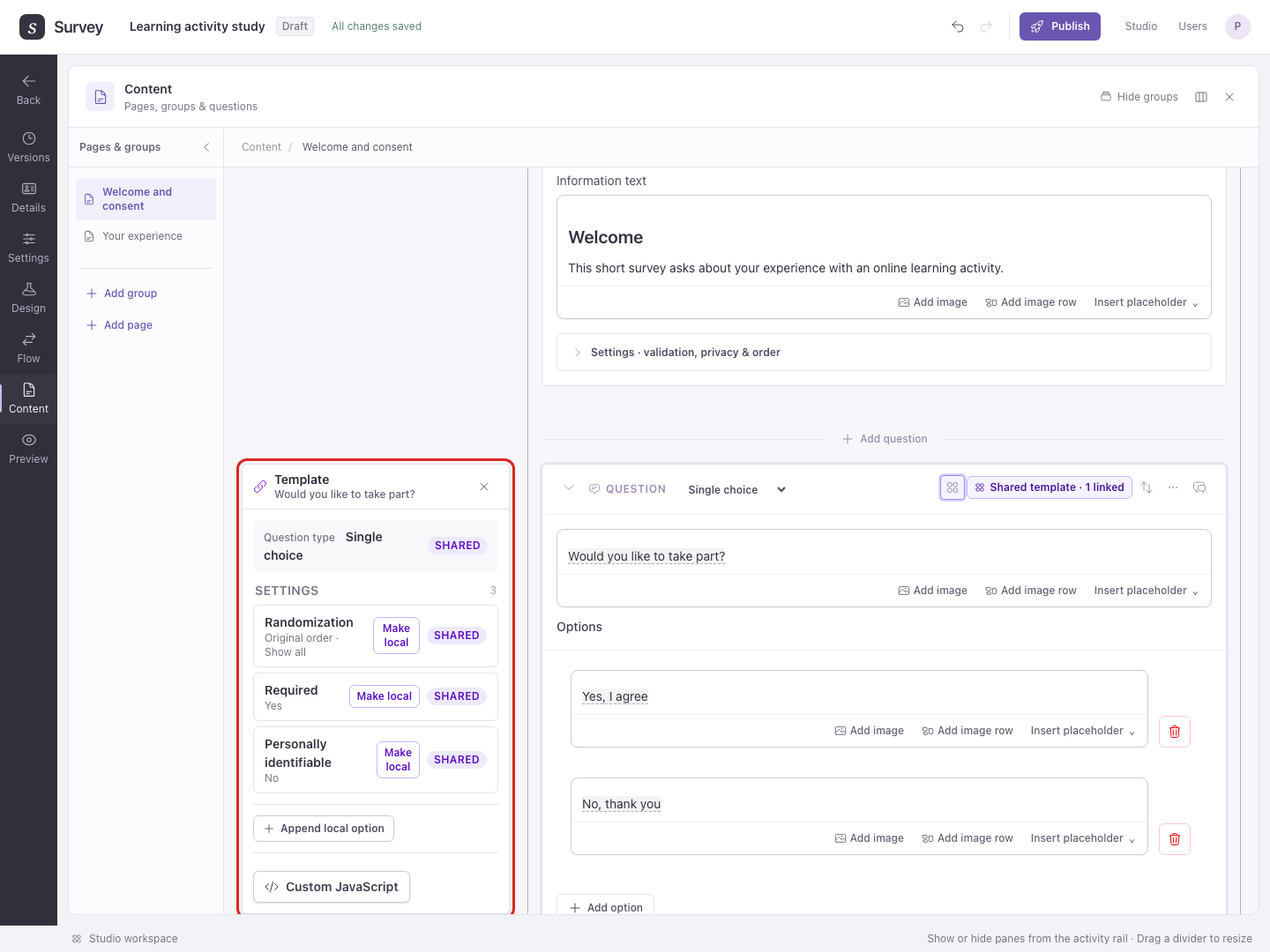
- Choose the shared-template badge in the question header (labeled Question template). The Template inspector shows which parts are Shared, Local, or Mixed.
Shared changes affect the linked questions. Local values belong to one question. Mixed items contain both. Read these labels before editing a question that has several linked copies.
Example: the same trust rating before and after a task
In a browser-extension study, you might ask How much do you trust this extension? before and after an extension-use task. Create Before task and After task pages inside the Permission Loop if both occasions should repeat for each extension.
- Add a Single choice trust question to Before task, with options
Not at all,A little, andA lot. - Choose Make synchronized, then Duplicate. Move the copy to After task using the Content move controls, and check both page placements in Flow.
- Edit a shared option label on one copy, then inspect the other copy. Shared wording and settings update together; the questions still collect separate answers at their respective placements.
- In Preview, answer both questions and check that both occasions appear for each extension. Linking wording does not create a route or repeat the question by itself.
- To measure trust at both occasions, add both questions as sources of a measured variable in Design → Variables.
For the main example's repeated installation question, the Permission Loop already reuses the same content for both extensions. Create linked copies only when you need distinct question placements with shared wording.
Vary one part of the wording
Example: ask “How helpful was the lecture?” and “How helpful was the exercise?” with the same rating options.
Start with one synchronized question. Select lecture in its prompt and choose Make placeholder. Give that placeholder a descriptive name, such as activity. Duplicate the question. On the copy, open Question template and expand the prompt field in the Template inspector. Edit the input labeled activity to exercise. This changes the placeholder value for that copy; Template text edits the shared surrounding wording. The surrounding wording remains shared.
In the Template inspector, Make local lets an individual setting or supported item vary. Make shared applies the selected value to the linked questions. Check the other copies in Preview after changing shared wording or structure.
Choose Unlink and keep wording from a question's actions menu when it should become independent. Its resolved wording stays in place, and future shared edits no longer apply to it.
To give newly created questions initial settings without linking them, use creation defaults.